
War Thunder Cheats with ESP, Aimbot & Vehicle ESP
Review current status, supplied setup information and configuration options before using the product.
Product Overview
At a glance
Key capabilities
What War Thunder Cheats focuses on before you open the full module list.
Plus 9 additional modules in the operator portal. See the full list below.
Overview
War Thunder controls for Windows PC
How modules, presets, and patch-day status checks fit ground forces battle workflows.
War Thunder Cheats brings together player and vehicle visibility information, aiming assistance, radar and configuration controls. Saved configurations let you organize preferences for different battle types.
The supplied information describes Windows PC use. Review the listed plan, requirements and current compatibility on warthunderscheat.com before purchase or launch.
This license covers War Thunder gameplay with vehicle and player visibility information, aiming options, radar, speed controls, zoom controls and map information.
Tune before you queue
Save preferred configurations, check current compatibility, and adjust visual and aiming options for your War Thunder setup.
Plans and delivery
Choose a listed plan at checkout. Review the current status and setup information before every session because availability can change with game updates.
Module layout
Visibility, aim, radar and configuration controls are organized separately so you can review each group before launching.
Modules
What's included
Every module and overlay shipped with War Thunder Cheats, toggle and tune in the operator portal.
- Player and vehicle visibility information
- Vehicle type, player nickname, distance and armour information
- Vector aim, silent aim and magic bullet options
- Aiming controls suited to vehicles and aircraft
- Radar for nearby activity
- Built-in, standalone and browser radar variants where supported
- Speed control and zoom-limit options where supported
- Map information controls where supported
- Save, load and organize configurations
- Windows PC compatibility
- Compatibility may vary by game build and product version
Experience
Loader layers · After checkout
Use the screenshots above for module layout; below is what each layer does and how portal access works after purchase.
In-game layers
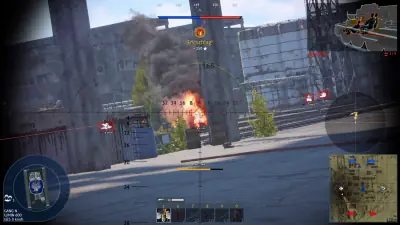
- Layer A
Ground-battle target view
A ground battle screenshot showing sight information, vehicle markers and the tactical map.
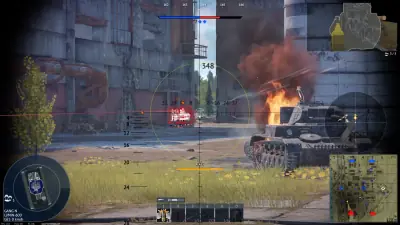
- Layer B
Urban vehicle visibility
A sight view of an urban ground battle with vehicle information and a tactical map.
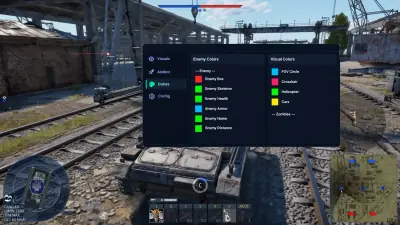
- Layer C
Visual configuration menu
Ground gameplay with the supplied visual color controls open over the rail-yard battle.
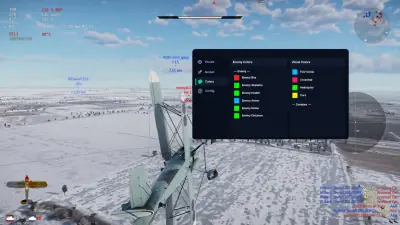
- Layer D
Air-battle configuration
Air gameplay with the supplied visual configuration controls opened over the snowy landscape.
More products
Pairs well with
Other tools from the same store, each with its own page and checkout.
- HWID Spoofer From $35 Changes disk serials, MAC addresses, GPU IDs and related identifiers after a hardware ban. Cleaner included. View details: HWID Spoofer
- UGC From $35 Unban & Governance Control: custom appeal workflows and dispute automation for restricted accounts on any platform. View details: UGC
- Skin Changer From $35 Lightweight tool that unlocks premium weapon skins, character outfits and rare knife variants across major titles. View details: Skin Changer
FAQ
Questions about this page
Answers tied to what you are reading. Visit the FAQ page for every topic.
Blog
Related guides
Filter by topic to find setup guides, feature deep-dives, and patch-day notes.
A practical checklist for reviewing the current War Thunder setup information on Windows PC.
A plain-language overview of the visibility, radar and aim feature groups listed for War Thunder.
A calm troubleshooting path for checking War Thunder cheat status after a game update.
War Thunder community forum
Read discussion
Archived, read-only threads on loader setup, vehicle ESP, patch status, and HWID bans. Replies are closed.
- Setup Help War Thunder cheat setup on Windows 11: what should I check first? A setup question about Windows compatibility, status and saved configurations.
- Features War Thunder vehicle ESP: tank, aircraft and ship information in one setup? A feature discussion about separating vehicle information by battle type.
- Status and Updates How do you check War Thunder cheat status before buying? A buying question about checking current compatibility instead of relying on old comments.